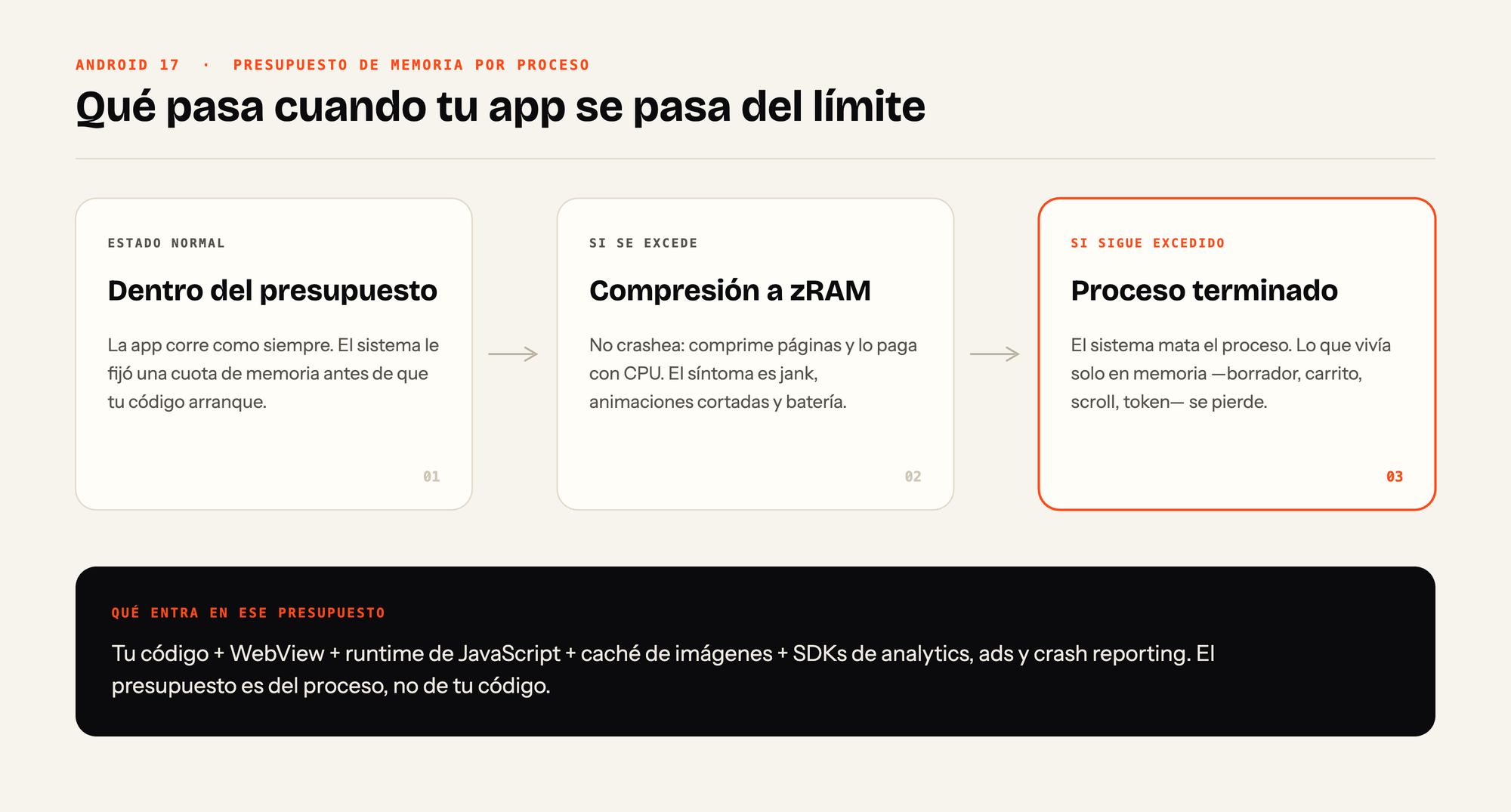
Google is rolling out to all of Android 17 the per-app memory limit it had already been testing on Pixels: if an app goes over the budget the system assigned it, it first gets pushed into compressed memory (zRAM) and, if it's still over after that, the process gets killed. According to the Hipertextual piece, the intent is for it to work on any device compatible with Android 17, from 4 GB of RAM up to more than 16 GB, and to reach phones from other manufacturers starting in 2027.
Why it matters
The signal isn't technical, it's economic. For fifteen years the mental model of anyone building for mobile was that RAM grows on its own: if your app uses too much, next year's hardware forgives you. That implicit contract is broken. Memory prices went up and manufacturers are cutting GB to avoid moving the retail price, so the platform does the only thing it can do: stop absorbing software's waste and hand it back to whoever generates it.
The second detail is more interesting than the headline. The fact that the feature targets the whole device range, and not just the low end, means it isn't an emergency mode for weak hardware: it's a per-process budget policy. RAM stops being an elastic resource you negotiate with the system and becomes a quota that's already fixed before your code even starts. The published material doesn't state the concrete values of that budget, nor which brands or which models will get it first, so any number you read out there today is speculation.
What changes in practice
First: the background process stops being a place to keep state. It was already fragile, but it counted as an edge case. With a mechanism that kills processes for exceeding a budget, process death becomes a normal execution path. If your app has an unsaved draft, a cart in memory, a scroll position, a token in an instance variable or a half-filled form, that now gets lost routinely.
Second, and this is what will cause the most confusion in production: the first stage doesn't break anything, it makes things slow. Compressing pages into zRAM trades memory pressure for CPU cycles. The symptom won't show up as a crash with a stack trace, but as jank, animations that stutter and battery draining away. You'll be debugging the render layer while the real problem is how much memory you're holding on to.
Third: the budget belongs to the process, not to your code. Inside it you've got the WebView, the JavaScript runtime if you use Capacitor or React Native, the image cache, the analytics SDK, the ads one, the crash reporting one and the three libraries somebody added for a single screen. In hybrid apps this hits twice, because you're loading the native heap and the JS VM heap at the same time.
On the backend side, the practical consequence is that your API has to tolerate clients that disappear without warning: resumable chunked uploads, idempotent writes with an operation key, cursor-based sync instead of long sessions, and no assuming an open socket will still be alive when the user switches apps.
On native Android there's a tool that already exists and that almost nobody implements seriously:
override fun onTrimMemory(level: Int) {
    if (level >= TRIM_MEMORY_RUNNING_LOW) {
        imageCache.evictAll()
        draftRepository.persistNow()  // the process may not come back
    }
}
The rule I'd apply: any state the user put effort into gets persisted the moment the app loses focus, not when the user hits save.
When NOT to use it
This isn't a feature you adopt, it's a constraint that's coming for you. And there are several honest reasons not to run off and rearchitect this week.

- There are no published thresholds. Without the concrete per-app budget values, optimizing is tuning blind. You can spend two sprints shaving 30 MB that never mattered, or fall short against a limit that turns out to be stricter than you assumed.
- The calendar argues against urgency. The rollout to third-party manufacturers starts in 2027, and your installed base moves even slower. Just look at how the real device lifecycle works: Xiaomi just added six models to its EOL list, which stop receiving Android versions and patches. A large chunk of your users will never see Android 17.
- Don't trade memory for network without measuring. The reflex reaction is to flush caches and reload everything from the API. For a user on a limited mobile data plan that makes the actual experience worse and raises your infrastructure bill to solve a problem your app may not even have.
- If your app runs short foreground sessions (a checkout, a reader, a tracker that runs and closes), the concrete risk is low and the redesign work doesn't pay for itself.
- Don't invent anti-kill tricks. Fake foreground services, bogus persistent notifications or child processes to dodge the budget are debt that Google closes in the next version, and in the meantime they cost you store reviews.
What I'd do today
Three things, none of them expensive. First, measure real usage on an actual mid-range device, not on an emulator with 16 GB, and write down the baseline number so you have something to compare against when the official limits show up. Second, add to the QA checklist a test almost nobody runs today: kill the process by hand with the app in the background and verify the user comes back exactly where they were. If that test passes, the RAM limit matters to you a lot less.
Third, wait for the numbers. You touch architecture when there's documentation with concrete values, not when there's an announcement. What is worth internalizing right now is the shift in mindset: memory stopped being free, and that's a permanent change, not a feature of one version.